
Guest View Links
Share a read-only snapshot of your deal — or specific parts of it — with people who need visibility but do not need full collaboration access. Board members, investors, and advisory committees can review progress without logging in.
Overview
Not everyone involved in a deal needs the ability to edit, comment, or upload documents. Some stakeholders just need to see where things stand. Guest View Links give you a way to share a read-only view of your deal with anyone, without requiring them to create a Vetting Vault account.
Each link is scoped to show only the sections and categories you choose. You control exactly what the viewer sees, how long the link stays active, and whether it requires a password. This makes it easy to share tailored views for different audiences without exposing the entire deal.
No account required
Creating a Guest View Link
Follow these steps to create a guest view link for your deal:
- Navigate to deal settings — Open the deal you want to share and go to Settings.
- Click “Create Guest Link” — This opens the guest link configuration panel.
- Select sections to include — Choose which categories and request sections should be visible through this link. You can include the entire deal or narrow it down to specific areas (for example, only the Financial section for an investor, or only the Legal section for outside counsel reviewing progress).
- Set an expiration date (optional) — Choose when the link should automatically expire. This is useful for time-sensitive updates like quarterly board reporting.
- Require email verification (optional) — Viewers must verify their email with a one-time code before accessing the link. This creates an identity trail for each viewer.
- Add password protection (optional) — Require viewers to enter a password before they can see the deal contents. Share the password separately via a secure channel. Combining email verification with password protection sets the link to the highest security level.
- Copy the link — Click “Generate Link” and copy the unique URL. Send it to your recipients via email, message, or however you normally communicate.
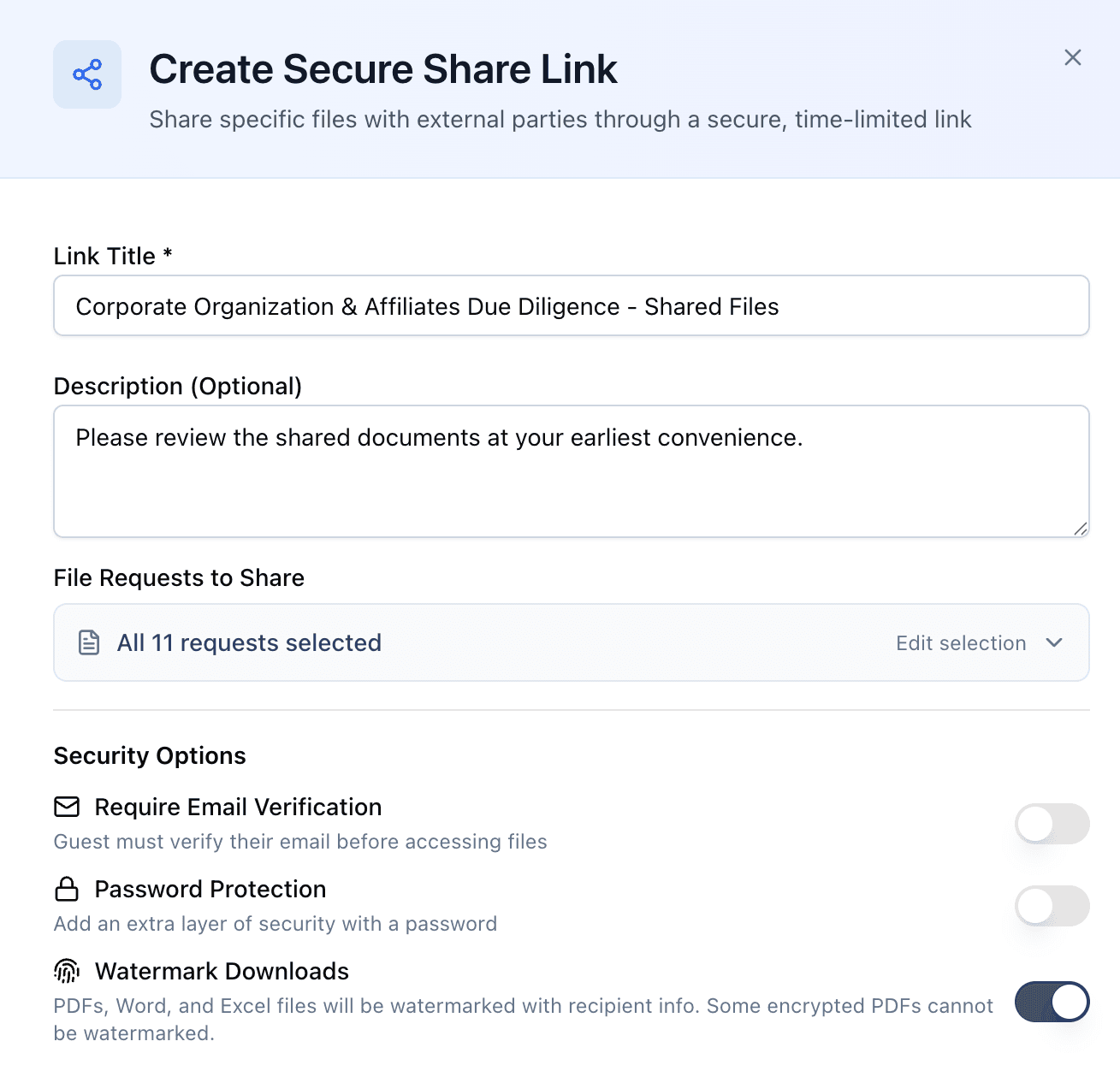
Configure security options including email verification, password protection, watermarking, and expiration when creating a share link.
Tip
What Guests Can See
Guest view links provide read-only access. Here is what viewers can and cannot do:
Guests CAN:
- View the request list with current statuses and progress
- See which requests have been completed, are in progress, or are still outstanding
- View uploaded documents attached to requests
- Download files for their own review
- See the overall deal progress bar and completion percentage
Guests CANNOT:
- Edit or change the status of any request
- Upload documents or new file versions
- Post comments or participate in discussions
- Access deal chat messages
- View Q&A threads (unless you specifically include them in the link scope)
- Invite other people or modify the deal in any way
The guest view is a point-in-time snapshot that updates live. Whenever a guest opens the link, they see the current state of the deal — not a frozen copy from when the link was created.
Link Security
Guest view links are designed to give you full control over who sees what, and for how long. Multiple layers of security ensure that sensitive deal information stays protected. Vetting Vault assigns a security level to each link — low, medium, or high — based on which protections you enable.
Email Verification
Require viewers to verify their email address before accessing the link. When enabled, the viewer enters their email and receives a one-time verification code. This confirms their identity and creates an audit trail of exactly who accessed the deal. Enabling email verification raises the link’s security level to medium.
Password Protection
When you enable password protection, anyone who opens the link must enter the correct password before any deal content is displayed. The password screen does not reveal any information about the deal — the viewer sees only a generic prompt.
Share passwords through a separate channel (phone call, text message, secure messaging app) rather than in the same email as the link. This ensures that even if the email is forwarded, the deal contents remain protected.
Expiration Dates
Set an expiration date to automatically deactivate a link after a specific date and time. Once expired, the link returns a message that access is no longer available. This is useful for time-bound access like quarterly reviews, investor reporting periods, or limited-window evaluations.
Access Tracking
Every guest link tracks access activity so you know exactly who is viewing your deal:
- View count — See how many times the link has been opened.
- Access timestamps — Know when each visit occurred.
- IP and location data — See the general location of viewers (useful for spotting unexpected access).
- Download activity — Track which documents were downloaded and when.
Warning
Watermarking
Watermarking adds a visible identity stamp to every document downloaded through a Guest View Link. If a document leaks, you can trace exactly who downloaded it and when. Your original files are never modified — watermarks are applied on the fly at the moment of download or preview.
Watermarking is on by default
Watermark Content
Each watermark includes the following information, rendered as a diagonal text overlay across the document:
- Confidentiality label — Every watermark begins with “CONFIDENTIAL” to clearly signal the document’s sensitive nature.
- Downloader’s email address — If the link requires email verification, the verified email is embedded. This is the strongest form of recipient identification.
- IP address — The IP address of the person downloading the file, providing a secondary identification method even for anonymous access.
- Download timestamp — The exact date and time in UTC, allowing you to correlate leaked documents with specific access events.
A typical watermark reads something like:
CONFIDENTIAL · [email protected] · IP: 203.0.113.42 · 2026-04-07 14:23 UTC
Every watermarked download is logged in the audit trail, capturing the file, link, full watermark text, recipient email, IP address, browser information, and exact timestamp.
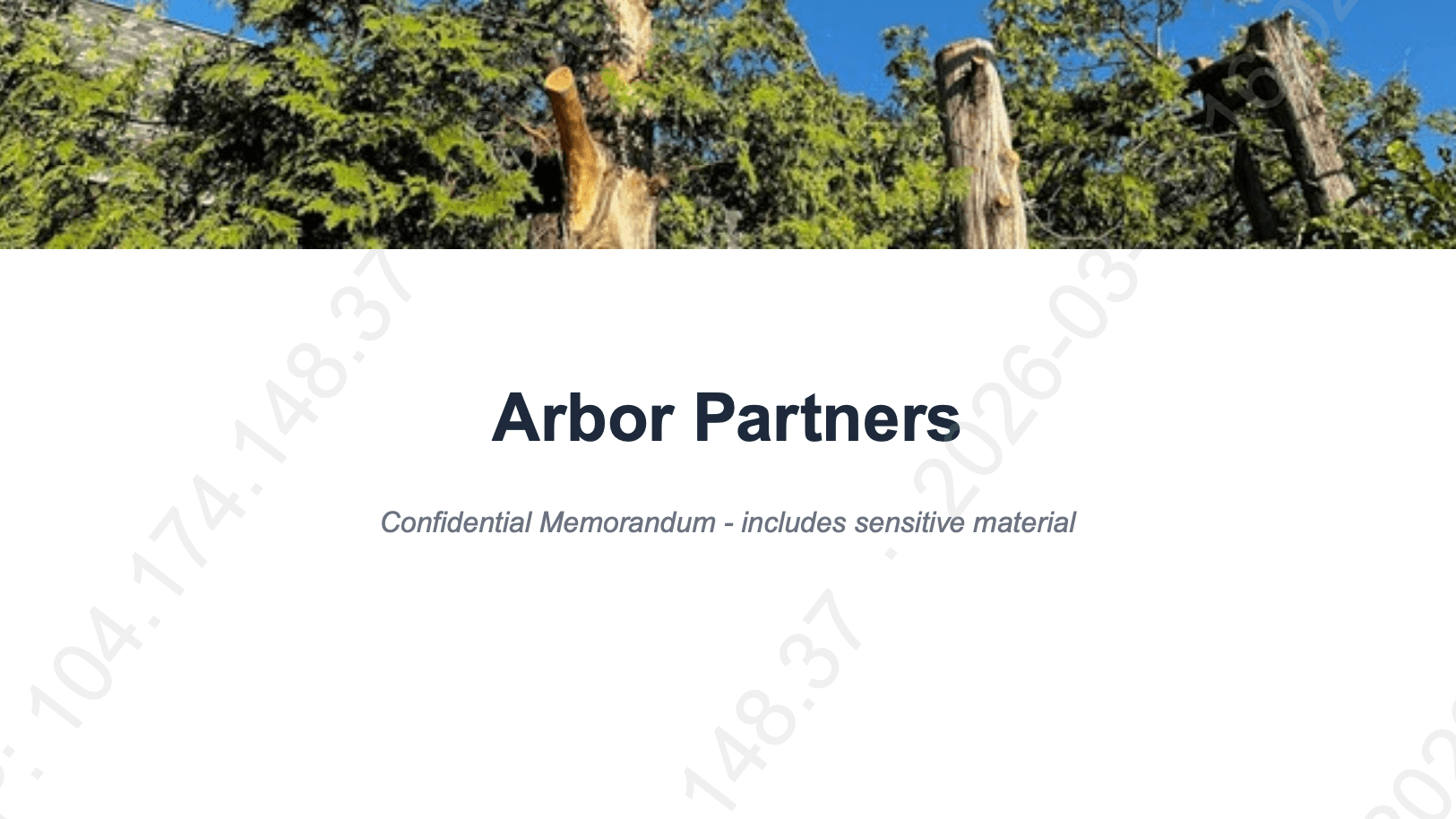
Watermarks are applied as diagonal overlays across every page, embedding recipient identity for leak tracing.
Opacity Control
Control how visible the watermark appears by selecting an intensity level in the link settings:
- Subtle (8%) — Barely visible. Best when readability is critical and you want minimal visual disruption.
- Light (12%) — The default. A good balance between visibility and readability for most deal documents.
- Medium (20%) — Clearly visible. Use when you want the watermark to serve as a strong visual deterrent.
- Bold (30%) — Prominently visible. Recommended for highly sensitive documents like proprietary financial models or trade secrets.
Supported Formats
Watermarks are applied to the three most common document formats in deal transactions:
- PDF documents — Diagonal text overlay across every page, including rotated pages. Applied during both downloads and inline previews.
- Word documents (.docx) — Uses the same VML header technique as Word’s native watermark. Appears naturally when opened in Word or compatible applications.
- Excel spreadsheets (.xlsx) — Adds a “CONFIDENTIAL” sheet as the first tab with watermark details. All existing sheets, formulas, and formatting are untouched.
Encrypted PDFs
Bulk Downloads
When a guest uses “Download All as ZIP,” each supported file in the archive is individually watermarked before being added to the ZIP. Unsupported file types are included without modification. This ensures consistent protection even when guests download entire sections at once.
Combine watermarking with email verification
Managing Guest Links
You can manage all guest links for a deal from the deal settings page. The Guest Links panel shows every active and expired link along with its configuration.
- View all active links — See a list of every guest link you have created for the deal, along with its scope, expiration date, and access count.
- Revoke a link — Immediately deactivate any link. Once revoked, the link can no longer be used to view the deal. Revocation is instant and cannot be undone (you would need to create a new link).
- Edit link settings — Change the scope, password, or expiration date of an existing link without generating a new URL. The link stays the same, but the access rules change.
- View access logs — Click on any link to see its detailed access history, including timestamps, locations, and download activity.
- Create multiple links — There is no limit on how many guest links you can create for a single deal. Create as many as you need for different audiences and purposes.
Use Cases
Board Reporting
Share deal progress with your board of directors or investment committee without giving them full platform access. Create a scoped link that shows overall progress, key milestones, and completed items. Set a monthly or quarterly expiration so stale links do not linger. Board members get the visibility they need, and you do not have to prepare a separate status report — the live deal view is the report.
Investor Updates
Keep your investor group informed on deal pipeline status. Share a link scoped to the high-level deal dashboard showing completion percentages, category-level progress, and key document statuses. Investors can check in on their own schedule without emailing you for updates. Password-protect the link for an extra layer of security.
Client Previews
Before a formal signing or closing, let your clients preview the documents that have been collected. An M&A advisor can share a read-only link with the seller showing all collected documents organized by category. The seller can confirm everything looks correct without needing to log in. This is also useful for lenders who want borrowers to verify their submitted documents are complete and accurate.
Tip