Why our AI does work that bolt-on AI cannot
AI is only as useful as the structure of the data underneath it. Folders give an AI almost nothing. Request-first intake gives it exactly the context it needs.
Request-first intake
Every file enters the system attached to a specific request — “most recent three years of bank statements,” “current AR aging.”
Structured knowledge base
Documents are classified by type, text-extracted, and indexed against the deal structure. The system knows what each file is supposed to be.
Analysis & agentic work
Deal AI can do real analytical work because the data is structured because the intake was request-first.
Two surfaces, one knowledge base
Deal AI shows up in two places inside your deal. They share the same context and hand off to each other.
The sidebar — work on demand
A persistent panel inside every deal. Ask Deal AI to do analytical work on the files: combine, extract, compare, reconcile. Outputs stream in with source citations and a confidence pill.
- → Grounded in this deal’s files, requests, Q&A, and chat
- → Citations on every reference
- → Confidence pills, including a “review” flag for uncertain outputs
Per-file summary cards — passive AI on every document
A small sparkle appears on every classified file. Click it for a structured popover with the most useful fields already extracted. No prompt required.
- → Templates for P&Ls, balance sheets, bank statements, tax returns, LOIs
- → Amber “review” badge when confidence is low
- → “Ask Deal AI about this file” hands off into the sidebar with the file pre-loaded as context
Real work on the documents in your deal
These are the kinds of tasks Deal AI runs against the files already in your data room. Every output cites the source documents it pulled from.
Combine three years of P&Ls into a normalized summary
Pulls Revenue, Gross Profit, Operating Income, and Net Income across multiple statements into one comparable view.
Extract deposits, withdrawals, and average balance from every bank statement
Builds a structured table from PDFs that would otherwise be reviewed line-by-line.
Reconcile the seller's working capital schedule against the trial balance
Cross-checks figures the seller provided against the underlying accounting export and surfaces the differences.
Compile candidate resumes into a ranked Excel by years of experience
Produces a sortable file and attaches it back to the request so the rest of the team works from the same artifact.
Extract every change-of-control clause from the contracts folder
Scans every uploaded contract, pulls the relevant clauses verbatim, and cites which contract each came from.
Compare revenue across the tax return, the P&L, and bank deposits
The kind of cross-document check folder-based data rooms structurally cannot do.
Not a chatbot. Deal AI is framed around doing the work on the documents, not answering trivia about the deal. Status questions like “what’s overdue?” work too, but they’re the secondary use case.
2025 revenue across the three sources:
The Deal AI sidebar working through a multi-document task with citations back to each source file.
Every classified file gets a structured summary
AI metadata appears inline on every file row before you even click in. Open the sparkle for the full structured view. Each document type has its own template.
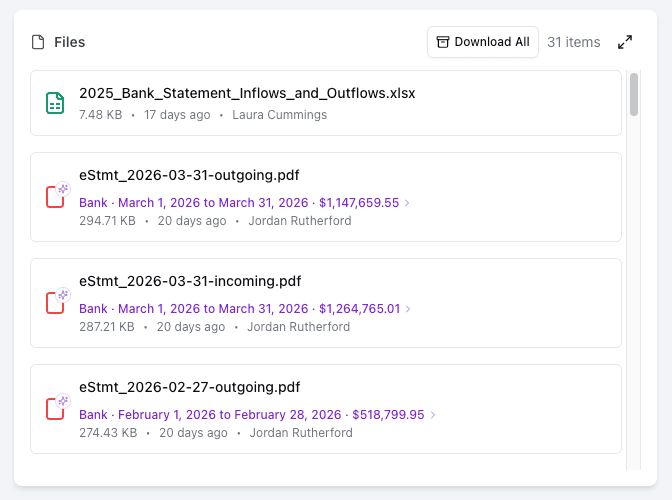
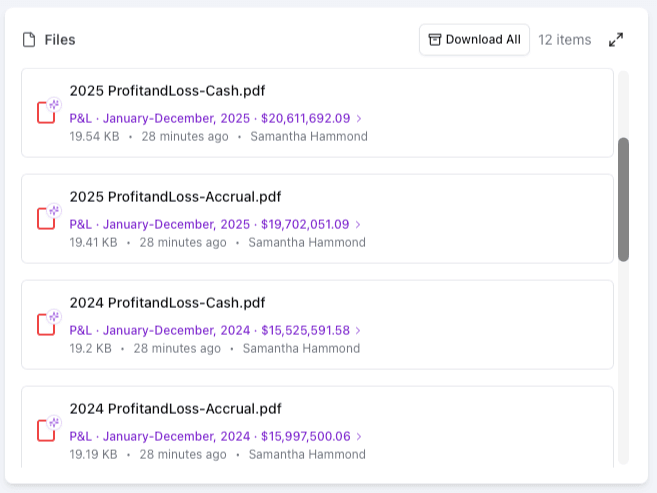
The same passive AI runs on bank statements, P&Ls, tax returns, and more — the one-line summary lands on the file row automatically.
P&L Statements
Period · Revenue · Gross Profit · Operating Income · Net Income
Balance Sheets
Period · Total Assets · Total Liabilities · Total Equity
Bank Statements
Institution · Account · Period · Beginning Balance · Ending Balance · Total Deposits · Total Withdrawals
Tax Returns
Tax Year · Entity · Gross Revenue · Taxable Income · Taxes Paid
LOIs / IOIs / Term Sheets
Buyer · Target · Cash · Equity / Rollover · Earnout · Financing Condition · Exclusivity · Expiration
The summary card and the sidebar share the same understanding of the file. Click “Ask Deal AI about this file” in any summary card and the sidebar opens with that file already loaded as context.
Honest about what it knows
Deal AI shows you where its answer came from and how confident it is. You can verify every number against the source.
Source citations on every answer
When Deal AI references a number, it tells you which file it came from. Click the citation to open the source document at the page it pulled from.
Confidence pills, including 'review'
Low-confidence outputs are flagged with an amber 'AI — review' badge. The agent tells you when it's not sure, instead of guessing.
Grounded in this deal only
Outputs are drawn from the files, requests, Q&A, and chat in this specific deal. The agent does not pull from the broader internet or other deals.
Examples of what Deal AI produces
Structured summaries on every classified file — the most useful fields pulled out automatically, ready to act on.
Institution
Bank of America
Account Ending
•••• 0509
Period
Feb 1 – Feb 28, 2026
Beginning Balance
$446,559.45
Ending Balance
$518,799.95
Total Deposits
$1,386,000.00
Total Withdrawals
$1,313,757.50
Bank statement for ACME, Inc. for February 2026, showing $1,386,000 in deposits against $1,313,757.50 in withdrawals.
Period
Jan – Dec 2025
Revenue
$20,611,692.09
Gross Profit
$20,598,892.09
Operating Income
$3,757,680.85
Net Income
$3,773,127.49
Profit and Loss statement for ACME, Inc. for January–December 2025, showing $20.6M in revenue and $3.77M in net income.
Pull deal data into your own AI workflows
Vetting Vault ships an MCP server with OAuth-based access. Connect Claude, ChatGPT, or your own agent and they can read the same structured knowledge base Deal AI runs on — without an export step.
The MCP server is most useful to sophisticated buyers who already have their own analysis tools. We meet you where you work.